状态与渲染树中的位置相关
React 会为 UI 中的组件结构构建 渲染树。
当向一个组件添加状态时,那么可能会认为状态“存在”在组件内。但实际上,状态是由 React 保存的。React 通过组件在渲染树中的位置将它保存的每个状态与正确的组件关联起来。
只有有对应的渲染树结点的State才会被保留,一但这个结点的组件消失了,那么他的State也会消失
相同位置的相同组件会使得 state 被保留下来
记住 对 React 来说重要的是组件在 UI 树中的位置,而不是在 JSX 中的位置! 这个组件在 if 内外有两个return 语句,它们带有不同的 <Counter /> JSX 标签:
import { useState } from 'react';

export default function App() {
  const [isFancy, setIsFancy] = useState(false);
  if (isFancy) {
    return (
      <div>
        <Counter isFancy={true} />
        <label>
          <input
            type="checkbox"
            checked={isFancy}
            onChange={e => {
              setIsFancy(e.target.checked)
            }}
          />
          使用好看的样式
        </label>
      </div>
    );
  }
  return (
    <div>
      <Counter isFancy={false} />
      <label>
        <input
          type="checkbox"
          checked={isFancy}
          onChange={e => {
            setIsFancy(e.target.checked)
          }}
        />
        使用好看的样式
      </label>
    </div>
  );
}

function Counter({ isFancy }) {
  const [score, setScore] = useState(0);
  const [hover, setHover] = useState(false);

  let className = 'counter';
  if (hover) {
    className += ' hover';
  }
  if (isFancy) {
    className += ' fancy';
  }

  return (
    <div
      className={className}
      onPointerEnter={() => setHover(true)}
      onPointerLeave={() => setHover(false)}
    >
      <h1>{score}</h1>
      <button onClick={() => setScore(score + 1)}>
        加一
      </button>
    </div>
  );
}
你可能以为当你勾选复选框的时候 state 会被重置,但它并没有!这是因为 两个 <Counter /> 标签被渲染在了相同的位置。 React 不知道你的函数里是如何进行条件判断的,它只会“看到”你返回的树。
在这两种情况下,App 组件都会返回一个包裹着 <Counter /> 作为第一个子组件的 div。这就是 React 认为它们是 同一个 <Counter /> 的原因。你可以认为它们有相同的“地址”:根组件的第一个子组件的第一个子组件。不管你的逻辑是怎么组织的,这就是 React 在前后两次渲染之间将它们进行匹配的方式。
相同位置的不同组件会使 state 重置
你在相同位置对 不同 的组件类型进行切换。刚开始 <div> 的第一个子组件是一个 Counter。但是当你切换成 p 时,React 将 Counter 从 UI 树中移除了并销毁了它的状态。
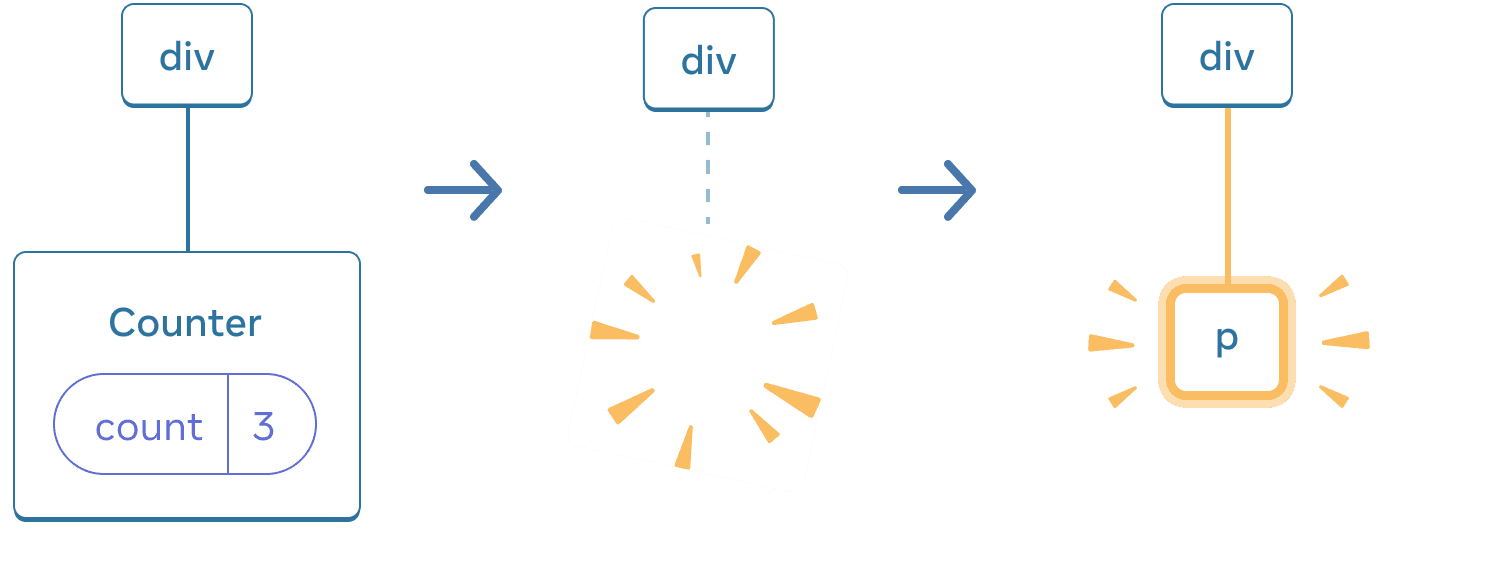
当 Counter 变为 p 时,Counter 会被移除,同时 p 被添加。
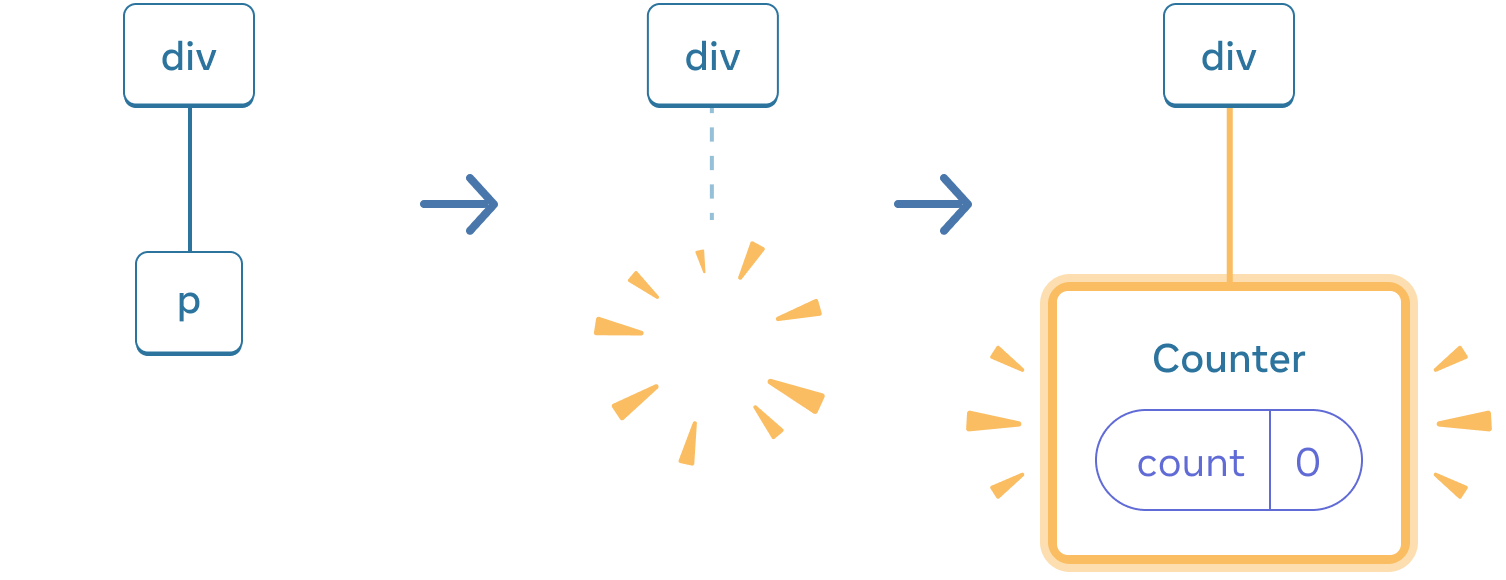
当切换回来时,p 会被删除,而 Counter 会被添加
一般来说,如果你想在重新渲染时保留 state,几次渲染中的树形结构就应该相互“匹配”。结构不同就会导致 state 的销毁,因为 React 会在将一个组件从树中移除时销毁它的 state。
在相同位置重置 state
默认情况下,React 会在一个组件保持在同一位置时保留它的 state。有两个方法可以在它们相互切换时重置 state:
- 将组件渲染在不同的位置
- 使用
key赋予每个组件一个明确的身份
方法一:将组件渲染在不同的位置
import { useState } from 'react';

export default function Scoreboard() {
  const [isPlayerA, setIsPlayerA] = useState(true);
  return (
    <div>
      {isPlayerA &&
        <Counter person="Taylor" />
      }
      {!isPlayerA &&
        <Counter person="Sarah" />
      }
      <button onClick={() => {
        setIsPlayerA(!isPlayerA);
      }}>
        下一位玩家!
      </button>
    </div>
  );
}

function Counter({ person }) {
  const [score, setScore] = useState(0);
  const [hover, setHover] = useState(false);

  let className = 'counter';
  if (hover) {
    className += ' hover';
  }

  return (
    <div
      className={className}
      onPointerEnter={() => setHover(true)}
      onPointerLeave={() => setHover(false)}
    >
      <h1>{person} 的分数:{score}</h1>
      <button onClick={() => setScore(score + 1)}>
        加一
      </button>
    </div>
  );
}- 起初
isPlayerA的值是true。所以第一个位置包含了Counter的 state,而第二个位置是空的。 - 当你点击“下一位玩家”按钮时,第一个位置会被清空,而第二个位置现在包含了一个
Counter。
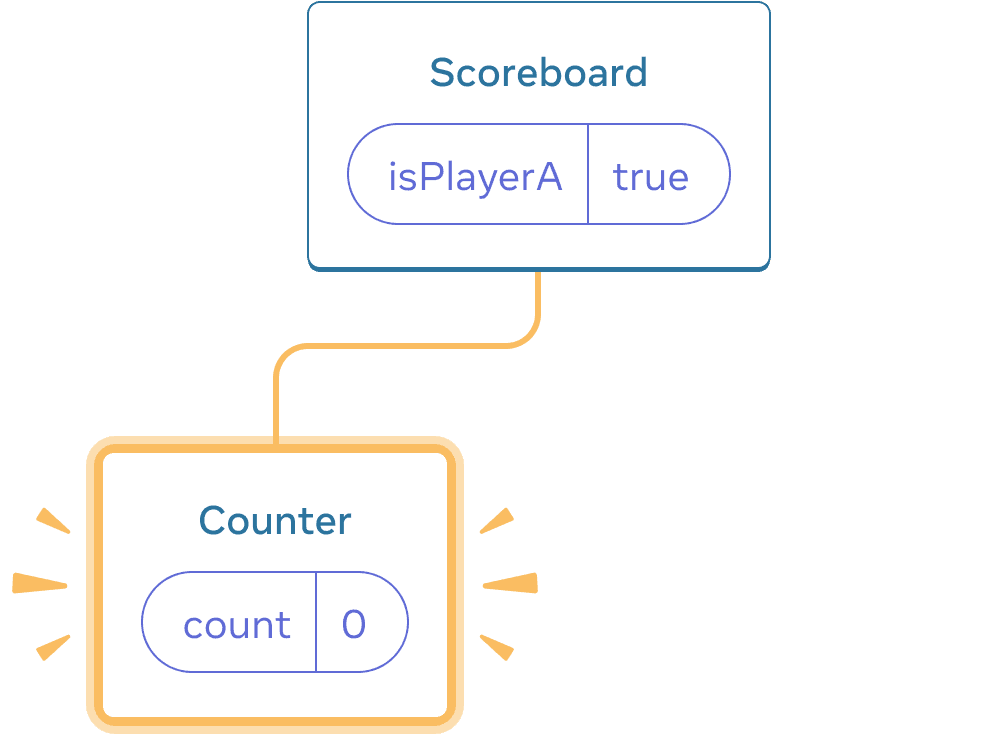
Initial state
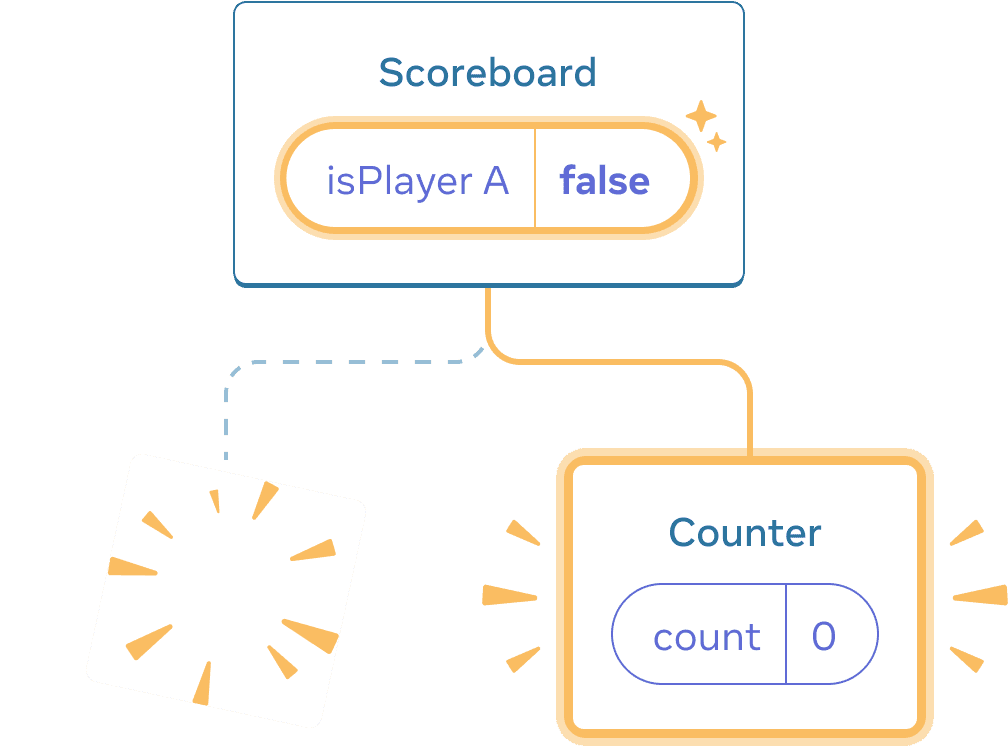
Clicking “next”
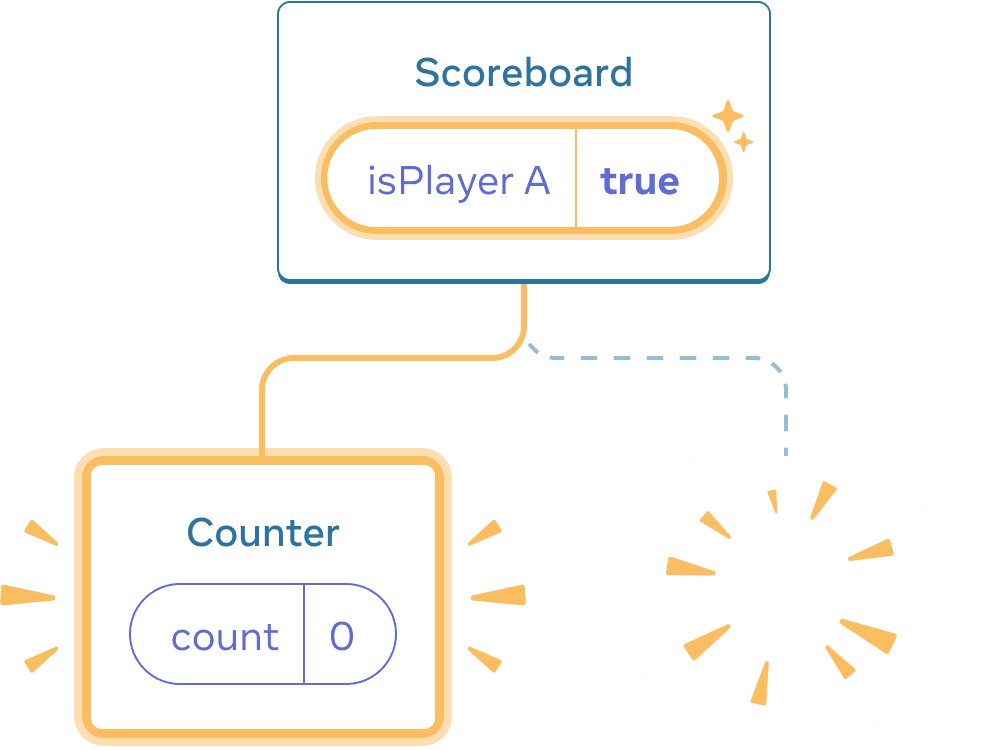
Clicking “next” again
每当 Counter 组件从 DOM 中移除时,它的 state 会被销毁。这就是每次点击按钮它们就会被重置的原因。
这个解决方案在你只有少数几个独立的组件渲染在相同的位置时会很方便。这个例子中只有 2 个组件,所以在 JSX 里将它们分开进行渲染并不麻烦。
方法二:使用 key 来重置 state
还有另一种更通用的重置组件 state 的方法。
你可能在 渲染列表 时见到过 key。但 key 不只可以用于列表!你可以使用 key 来让 React 区分任何组件。默认情况下,React 使用父组件内部的顺序(“第一个计数器”、“第二个计数器”)来区分组件。请记住 key 不是全局唯一的。它们只能指定 父组件内部 的顺序。
export default function Scoreboard() {
  const [isPlayerA, setIsPlayerA] = useState(true);
  return (
    <div>
      {isPlayerA ? (
        <Counter key="Taylor" person="Taylor" />
      ) : (
        <Counter key="Sarah" person="Sarah" />
      )}
      <button onClick={() => {
        setIsPlayerA(!isPlayerA);
      }}>
        下一位玩家!
      </button>
    </div>
  );
}
为被移除的组件保留 state
在真正的聊天应用中,你可能会想在用户再次选择前一个收件人时恢复输入 state。对于一个不可见的组件,有几种方法可以让它的 state “活下去”:
- 与其只渲染现在这一个聊天,你可以把 所有 聊天都渲染出来,但用 CSS 把其他聊天隐藏起来。这些聊天就不会从树中被移除了,所以它们的内部 state 会被保留下来。这种解决方法对于简单 UI 非常有效。但如果要隐藏的树形结构很大且包含了大量的 DOM 节点,那么性能就会变得很差。
- 你可以进行 状态提升 并在父组件中保存每个收件人的草稿消息。这样即使子组件被移除了也无所谓,因为保留重要信息的是父组件。这是最常见的解决方法。
- 除了 React 的 state,你也可以使用其他数据源。例如,也许你希望即使用户不小心关闭页面也可以保存一份信息草稿。要实现这一点,你可以让
Chat组件通过读取localStorage对其 state 进行初始化,并把草稿保存在那里。
无论采取哪种策略,与 Alice 的聊天在概念上都不同于 与 Bob 的聊天,因此根据当前收件人为 <Chat> 树指定一个 key 是合理的。