使用Context深层传递参数
这和Vue的provide与inject一样
你可以通过以下三个步骤来实现它:
- 创建 一个 context。(你可以将其命名为
LevelContext, 因为它表示的是标题级别。) - 在需要数据的组件内 使用 刚刚创建的 context。(
Heading将会使用LevelContext。) - 在指定数据的组件中 提供 这个 context。(
Section将会提供LevelContext。)
Context 可以让父节点,甚至是很远的父节点都可以为其内部的整个组件树提供数据。
同级子组件使用 context

远亲组件使用 context
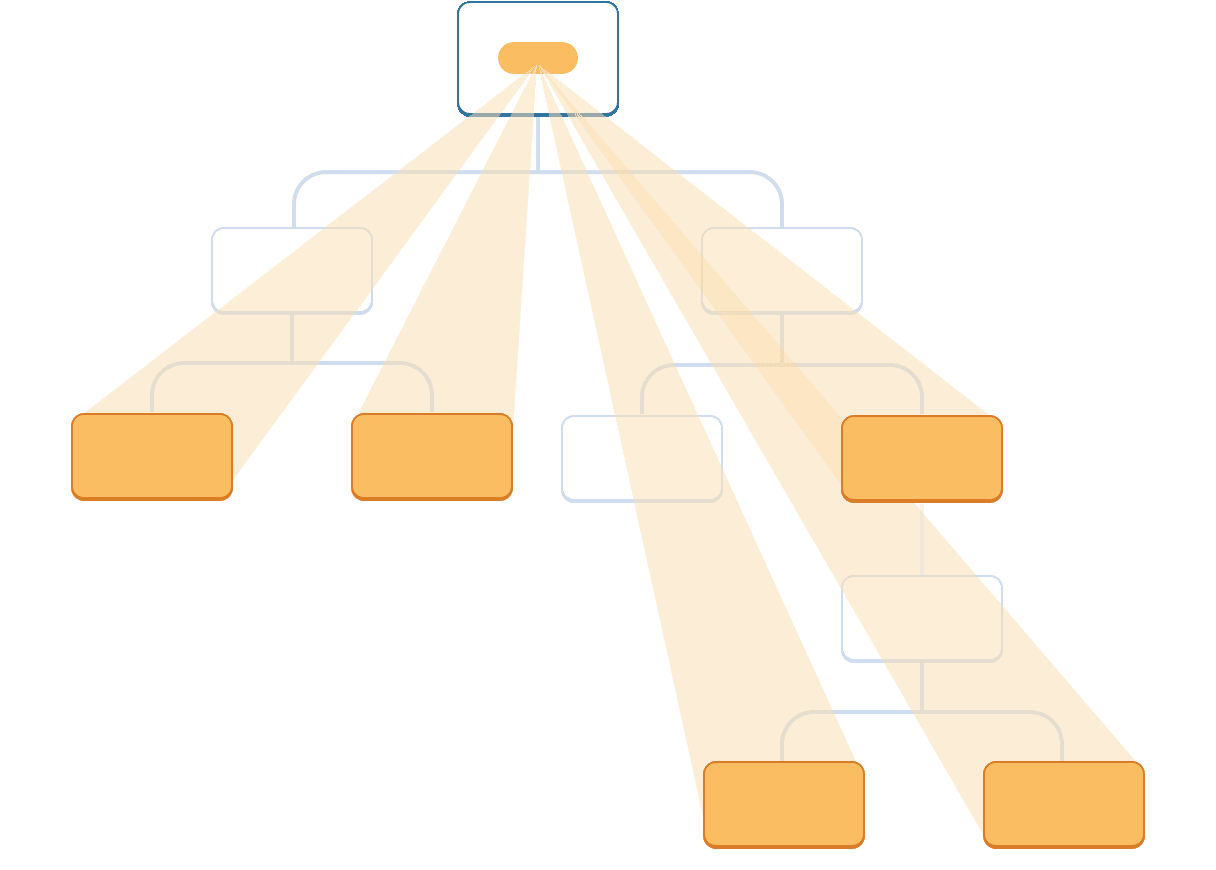
Step 1:创建 context
首先,你需要创建这个 context,并 将其从一个文件中导出,这样你的组件才可以使用它:
import { createContext } from 'react';
export const LevelContext = createContext(1);
createContext 只需默认值这么一个参数。
Step 2:使用 Context
从 React 中引入 useContext Hook 以及你刚刚创建的 context:
import { useContext } from 'react';
import { LevelContext } from './LevelContext.js';目前,Heading 组件从 props 中读取 level:
export default function Heading({ level, children }) { // ...}删掉 level 参数并从你刚刚引入的 LevelContext 中读取值:
export default function Heading({ children }) {
	const level = useContext(LevelContext);  // ...
}
useContext 是一个 Hook。和 useState 以及 useReducer一样,你只能在 React 组件中(不是循环或者条件里)立即调用 Hook。useContext 告诉 React Heading 组件想要读取 LevelContext。
Step 3:提供 context
Section 组件目前渲染传入它的子组件:
export default function Section({ children }) {
  return (
    <section className="section">
      {children}
    </section>
  );
}
把它们用 context provider 包裹起来 以提供 LevelContext 给它们:
import { LevelContext } from './LevelContext.js';

export default function Section({ level, children }) {
  return (
    <section className="section">
      <LevelContext value={level}>
        {children}
      </LevelContext>
    </section>
  );
}
==这告诉 React:“如果在 <Section> 组件中的任何子组件请求 LevelContext,给他们这个 level。”组件会使用 UI 树中在它上层最近的那个 <LevelContext> 传递过来的值。==
写在你使用 context 之前
使用 Context 看起来非常诱人!然而,这也意味着它也太容易被过度使用了。如果你只想把一些 props 传递到多个层级中,这并不意味着你需要把这些信息放到 context 里。
在使用 context 之前,你可以考虑以下几种替代方案:
- 从 传递 props 开始。 如果你的组件看起来不起眼,那么通过十几个组件向下传递一堆 props 并不罕见。这有点像是在埋头苦干,但是这样做可以让哪些组件用了哪些数据变得十分清晰!维护你代码的人会很高兴你用 props 让数据流变得更加清晰。
- 抽象组件并 将 JSX 作为
children传递 给它们。 如果你通过很多层不使用该数据的中间组件(并且只会向下传递)来传递数据,这通常意味着你在此过程中忘记了抽象组件。举个例子,你可能想传递一些像posts的数据 props 到不会直接使用这个参数的组件,类似<Layout posts={posts} />。取而代之的是,让Layout把children当做一个参数,然后渲染<Layout><Posts posts={posts} /></Layout>。这样就减少了定义数据的组件和使用数据的组件之间的层级。
如果这两种方法都不适合你,再考虑使用 context。
Context 的使用场景
- 主题: 如果你的应用允许用户更改其外观(例如暗夜模式),你可以在应用顶层放一个 context provider,并在需要调整其外观的组件中使用该 context。
- 当前账户: 许多组件可能需要知道当前登录的用户信息。将它放到 context 中可以方便地在树中的任何位置读取它。某些应用还允许你同时操作多个账户(例如,以不同用户的身份发表评论)。在这些情况下,将 UI 的一部分包裹到具有不同账户数据的 provider 中会很方便。
- 路由: 大多数路由解决方案在其内部使用 context 来保存当前路由。这就是每个链接“知道”它是否处于活动状态的方式。如果你创建自己的路由库,你可能也会这么做。
- 状态管理: 随着你的应用的增长,最终在靠近应用顶部的位置可能会有很多 state。许多遥远的下层组件可能想要修改它们。通常 将 reducer 与 context 搭配使用来管理复杂的状态并将其传递给深层的组件来避免过多的麻烦。
Context 不局限于静态值。如果你在下一次渲染时传递不同的值,React 将会更新读取它的所有下层组件!这就是 context 经常和 state 结合使用的原因。
一般而言,如果树中不同部分的远距离组件需要某些信息,context 将会对你大有帮助。