懂车帝-前端实习
1 流程
- 自我介绍
- 提问
- 代码
2 代码
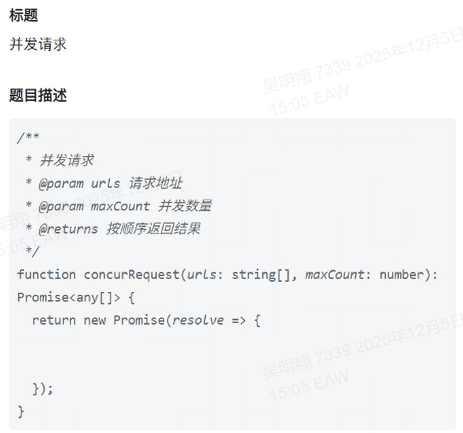
- 并发请求
- Vue数据双向绑定
3 提问
- v-model的原理
- Vue的数组响应式是怎么实现的
- Vue2与Vue3之间的区别
- Commonjs能不能摇树优化,为什么?
- Commonjs的底层与ESM的底层实现是怎么样的
- MVVM与MVC
- 浏览器缓存,如果强缓存的转态码是多少
- 存储位置,什么什么catch??
- 图片的预加载还没有从服务器上拉下来,但是我真实要加载的图片已经发送了请求,那么这时候预加载还有效吗???这又是什么,怎么就问这些偏难怪
4 复盘反思
其实是很好的一次面试,就算我没有通过,他也给我提供了提升的方向,而不是不知道自己该学习什么。我希望自己能不端的提升自己直到成为一个优秀的前端工程师(当然是高级的前端工程师)
参考答案
一、流程
1. 自我介绍(建议模板)
> “您好,我是XXX,毕业于XX大学计算机专业,目前有X年前端开发经验。主要技术栈包括 Vue/React、TypeScript、Webpack/Vite 等,熟悉前端工程化、性能优化和跨端方案。在上一家公司参与过 XX 项目(可简述),对 MVVM 框架原理、浏览器机制、模块系统等底层知识也有一定研究。今天很高兴有机会参加贵公司的面试。”
> Tips:简洁、突出技术栈 + 项目经验 + 对原理的兴趣,契合面试官后续提问方向。
二、代码实现
1. 实现一个并发请求(控制最大并发数)
/**
 * 并发请求控制器,限制最大并发数量
 * @param {Array<Function>} tasks - 返回 Promise 的函数数组
 * @param {number} maxConcurrency - 最大并发数
 * @returns {Promise<Array>} 所有任务的结果
 */
function concurrentRequest(tasks, maxConcurrency = 3) {
  return new Promise((resolve) => {
    const results = [];
    let index = 0;
    let completed = 0;

    function run() {
      while (index < tasks.length && running < maxConcurrency) {
        const i = index++;
        const task = tasks[i];
        running++;

        task()
          .then((res) => {
            results[i] = res;
          })
          .catch((err) => {
            results[i] = err;
          })
          .finally(() => {
            running--;
            completed++;
            if (completed === tasks.length) {
              resolve(results);
            } else {
              run(); // 继续调度
            }
          });
      }
    }

    let running = 0;
    run();
  });
}

// 使用示例
const tasks = Array.from({ length: 10 }, (_, i) =>
  () => fetch(`/api/data/${i}`).then(res => res.json())
);

concurrentRequest(tasks, 3).then(console.log);
> 关键点:使用“滑动窗口”思想,通过 running 控制并发数,finally 中继续调度新任务。
2. 手写 Vue 数据双向绑定(Vue 2 风格)
<div id="app">
  <input v-model="text" />
  <p>{{ text }}</p>
</div>

<script>
class Vue {
  constructor(options) {
    this.$options = options;
    this.$data = options.data;
    this.observe(this.$data);
    this.compile(options.el);
  }

  observe(obj) {
    if (!obj || typeof obj !== 'object') return;
    Object.keys(obj).forEach(key => {
      this.defineReactive(obj, key, obj[key]);
    });
  }

  defineReactive(obj, key, val) {
    // 递归监听嵌套对象
    this.observe(val);
    const dep = new Dep();
    Object.defineProperty(obj, key, {
      enumerable: true,
      configurable: true,
      get() {
        Dep.target && dep.addSub(Dep.target);
        return val;
      },
      set(newVal) {
        if (newVal === val) return;
        val = newVal;
        this.observe(newVal); // 新值也需响应式
        dep.notify();
      }
    });
  }

  compile(el) {
    const element = document.querySelector(el);
    this.compileElement(element);
  }

  compileElement(el) {
    const childNodes = el.childNodes;
    Array.from(childNodes).forEach(node => {
      if (node.nodeType === 1) {
        // 元素节点
        const attrs = node.attributes;
        Array.from(attrs).forEach(attr => {
          const attrName = attr.name;
          const attrValue = attr.value;
          if (attrName === 'v-model') {
            // 双向绑定
            node.value = this.$data[attrValue];
            node.addEventListener('input', (e) => {
              this.$data[attrValue] = e.target.value;
            });
            new Watcher(this, attrValue, (newValue) => {
              node.value = newValue;
            });
          }
        });
        // 递归子节点
        this.compileElement(node);
      } else if (node.nodeType === 3) {
        // 文本节点
        const reg = /\{\{(.+?)\}\}/g;
        let match;
        while ((match = reg.exec(node.nodeValue))) {
          const key = match[1].trim();
          new Watcher(this, key, (newValue) => {
            node.nodeValue = node.nodeValue.replace(reg, newValue);
          });
        }
      }
    });
  }
}

// 依赖收集器
class Dep {
  constructor() {
    this.subs = [];
  }
  addSub(watcher) {
    this.subs.push(watcher);
  }
  notify() {
    this.subs.forEach(watcher => watcher.update());
  }
}

Dep.target = null;

// 观察者
class Watcher {
  constructor(vm, key, cb) {
    this.vm = vm;
    this.key = key;
    this.cb = cb;
    Dep.target = this;
    // 触发 getter,完成依赖收集
    this.oldValue = vm.$data[key];
    Dep.target = null;
  }
  update() {
    const newValue = this.vm.$data[this.key];
    if (newValue !== this.oldValue) {
      this.cb(newValue);
      this.oldValue = newValue;
    }
  }
}

// 使用
new Vue({
  el: '#app',
  data: {
    text: 'hello'
  }
});
</script>
> 说明:此实现包含: > > - Observer(Object.defineProperty) > - Watcher(观察者) > - Dep(依赖收集) > - 编译器(compile)处理 v-model 和 > - 实现了数据 → 视图、视图 → 数据的双向绑定
三、提问详解
1. v-model 的原理
本质:语法糖。
在 input 上:
vue<input v-model="msg" /> <!-- 等价于 --> <input :value="msg" @input="msg = $event.target.value" />组件上:
vue<custom-input v-model="searchText" /> <!-- 等价于 --> <custom-input :model-value="searchText" @update:model-value="searchText = $event" />Vue 2 vs Vue 3:
- Vue 2:默认监听
input事件,prop 为value - Vue 3:使用
modelValue+update:modelValue,支持多v-model
- Vue 2:默认监听
> 核心:通过 value 绑定 + 事件监听实现双向通信。
2. Vue 的数组响应式是怎么实现的?
问题背景:Object.defineProperty 无法监听数组下标赋值(如 arr[0] = 1)和长度变化。
Vue 2 解决方案:
- 重写数组原型方法:对
push,pop,shift,unshift,splice,sort,reverse进行拦截。 - 在这些方法内部:
- 调用原生方法;
- 获取新增元素(如有)并对其做响应式处理;
- 手动触发更新(
dep.notify())。
const arrayProto = Array.prototype;
const arrayMethods = Object.create(arrayProto);
['push', 'pop', 'shift', 'unshift', 'splice', 'sort', 'reverse'].forEach(method => {
  arrayMethods[method] = function (...args) {
    const result = arrayProto[method].apply(this, args);
    // 处理新增项的响应式
    let inserted;
    if (method === 'push' || method === 'unshift') {
      inserted = args;
    } else if (method === 'splice') {
      inserted = args.slice(2);
    }
    if (inserted) ob.observeArray(inserted);
    // 触发更新
    ob.dep.notify();
    return result;
  };
});
> 注意:直接通过索引设置(arr[0] = val)或修改 length 仍不响应,需用 Vue.set 或 splice。
Vue 3:使用 Proxy,天然支持数组索引和长度变化,无需 hack。
3. Vue2 与 Vue3 的区别
| 维度 | Vue 2 | Vue 3 |
|---|---|---|
| 响应式原理 | Object.defineProperty | Proxy + Reflect |
| 组合式 API | 无(Options API) | setup() + ref/reactive |
| TypeScript 支持 | 不友好 | 原生支持 |
| Tree-shaking | 不支持(打包整个 Vue) | 支持(按需引入) |
| 性能 | 虚拟 DOM diff 较重 | 编译时优化(静态提升、PatchFlag) |
| Fragment / Teleport | 不支持 | 支持 |
| 自定义渲染器 | 困难 | 官方提供 createRenderer |
| IE11 支持 | 支持 | 不支持 |
> 关键升级:Proxy 解决了 Vue 2 的响应式缺陷(如数组、新增属性),组合式 API 提升逻辑复用能力。
4. CommonJS 能不能摇树优化?为什么?
不能。
原因:
CommonJS 是动态加载(运行时确定依赖),例如:
jsconst foo = require(someCondition ? './a' : './b');摇树优化(Tree Shaking)依赖静态分析(编译时确定哪些导出未被使用)。
ESM 的
import/export是静态的,构建工具(如 Webpack、Rollup)可在打包前分析依赖图,剔除未引用代码。CommonJS 的
module.exports和require()是赋值/调用操作,无法在编译时确定是否使用。
> 结论:只有 ESM 支持 Tree Shaking;CommonJS 无法被有效摇树。
5. CommonJS 与 ESM 的底层实现差异
| 特性 | CommonJS | ESM |
|---|---|---|
| 加载时机 | 运行时加载 | 编译时(静态)分析 |
| 模块缓存 | require.cache,首次加载后缓存 | 模块是单例,但由 JS 引擎管理 |
| 导出方式 | module.exports = {}(可动态修改) | export 声明(静态结构,不可变) |
| 导入方式 | require()(同步,返回值拷贝) | import(异步,返回实时只读引用) |
| 循环依赖 | 返回已执行部分的 exports 对象 | 允许,但需注意 TDZ(暂时性死区) |
| 顶层 this | 指向 module.exports | undefined |
> 关键区别:ESM 是静态、声明式、只读引用;CommonJS 是动态、命令式、值拷贝。
6. MVVM 与 MVC 的区别
| 模式 | 全称 | 核心思想 | 组件职责 |
|---|---|---|---|
| MVC | Model-View-Controller | Controller 作为中介,处理用户输入,更新 Model 和 View |
- Model:数据与业务逻辑
- View:UI 展示
- Controller:接收输入,协调 M 和 V | | MVVM | Model-View-ViewModel | ViewModel 通过数据绑定自动同步 View 和 Model |
- Model:同上
- View:UI,绑定到 ViewModel
- ViewModel:暴露数据和命令,自动同步(无需手动操作 DOM) |
> 关键差异: > > - MVC 中 View 和 Model 无直接联系,靠 Controller 桥接; > - MVVM 通过双向绑定解耦 View 和 Model,ViewModel 是胶水层; > - Vue、Angular 属于 MVVM;传统后端框架(如 Rails)多用 MVC。
7. 浏览器缓存:强缓存的状态码是多少?
强缓存不会发送请求到服务器,因此没有状态码!
- 强缓存命中时,浏览器直接从内存/磁盘读取资源,Network 面板显示
(memory cache)或(disk cache),状态码通常显示为200 (from memory cache)—— 但这不是 HTTP 状态码,而是 DevTools 的提示。
> 真正的 HTTP 状态码只在请求发出时才有。强缓存阶段根本没发请求!
强缓存控制字段:
Cache-Control: max-age=3600Expires: Wed, 05 Dec 2025 15:00:00 GMT
> 若缓存失效,则进入协商缓存(会发请求,返回 304 Not Modified 或 200)。
8. 存储位置?
你可能想问的是 Service Worker Cache 或 HTTP 缓存存储位置。
- HTTP 强缓存/协商缓存:存储在浏览器的 Disk Cache / Memory Cache 中(开发者工具 Network 可见)。
- Service Worker Cache:通过
caches.open(name).put()存储,属于 Cache Storage,独立于 HTTP 缓存。 - 其他存储:
localStorage/sessionStorage:键值对,持久化IndexedDB:客户端数据库Cookie:随请求自动发送
9. 图片预加载问题
> 场景:预加载图片 A(new Image().src = A),但正式请求 A 已发出。此时预加载还有效吗?
答案:有效,且能提升性能。
原理:
- 浏览器对同一 URL 的资源有全局缓存机制(包括内存缓存、磁盘缓存)。
- 预加载时,图片开始下载并存入缓存。
- 当正式
<img src="A">请求发出时:- 若预加载已完成 → 直接从缓存读取(毫秒级);
- 若预加载正在进行 → 浏览器会复用同一个 TCP 连接和下载流(Chrome 等现代浏览器支持);
- 即使正式请求先发,预加载后发,只要 URL 相同,最终都会共享缓存。
> 例外:若预加载和正式请求的 headers 不同(如 CORS、Referer),可能被视为不同资源,无法共享。
结论:预加载在绝大多数情况下有效,是常用的性能优化手段。